


목차(클릭하세요)

DOM: (Document Object Model)
[소스코드 참고 사이트]

1. DOM이란?
 HTML 문서를 객체의 트리 구조로 표현한 것
•
HTML: 가족 구성원들의 이름이 적힌 종이
•
DOM: 가족 관계를 나타내는 실제 가계도 (부모-자식 관계가 명확한 트리 구조)
•
JavaScript: 가계도를 보고 "김철수의 아버지는 누구지?" 같은 질문에 답하거나, 새 가족 구성원을 추가하는 사람
( 이 작업을 하는 사람이 자바스크립트 엔진)
1-1. 왜 필요한가?
 브라우저는 HTML 문서를 읽어서 DOM 트리를 만들고, 자바스크립트로 DOM에 접근하여 내용을 바꾸거나 추가/삭제할 수 있음
•
웹 페이지를 프로그래밍적으로 조작할 수 있게 해주는 인터페이스
1-2.DOM 구조 예시
<html>
<head>
<title>DOM 예제</title>
</head>
<body>
<h1 id="title">안녕하세요</h1>
<p class="msg">DOM 실습 중입니다.</p>
<button id="btn">클릭</button>
</body>
</html>
JavaScript
복사
이것을 도식화 해보면?
html
├── head
│ └── title
└── body
├── h1 (id="title")
├── p (class="msg")
└── button (id="btn")
JavaScript
복사
1-3.DOM 조작 예제코드
import "./styles.css";
// 1) 먼저 #app 안에 HTML을 채움
document.getElementById("app").innerHTML = `
<h1 id="title">안녕하세요</h1>
<p class="msg">DOM 실습 중입니다.</p>
<button id="btn">클릭</button>
`;
// 2) 그 다음 DOM을 선택
const title = document.getElementById("title");
const msg = document.querySelector(".msg");
const btn = document.getElementById("btn");
// 3) 버튼 클릭 시에만 DOM 조작되도록 변경
btn.addEventListener("click", function () {
title.textContent = "Hello DOM!";
msg.textContent = "이 문장은 DOM조작으로 바뀐거임.";
alert("버튼이 클릭됨!");
});
JavaScript
복사
2. SPA페이지와 전통적인 방식(MPA)
[SPA방식으로 구축된 페이지]
•
Gmail: 이메일을 클릭해도 페이지가 새로고침되지 않음
•
YouTube: 동영상 간 이동 시 부드러운 전환
•
Netflix: 콘텐츠 탐색 시 끊김 없는 경험
2-1. SPA
•
마치 디지털 잡지나 태블릿 앱
•
하나의 화면에서 내용만 바뀜
•
페이지 전체를 다시 로드하지 않고 필요한 부분만 업데이트
•
사용자 클릭 → JavaScript 실행 → DOM 업데이트 → 화면 부분 변경
2-2.전통적인 웹사이트(MPA)
•
MPA : Multi Page Application):
•
사용자 클릭 → 서버 요청 → 새 HTML 페이지 → 전체 페이지 새로고침
•
새로운 내용을 보려면 페이지를 넘겨야 함 (새로고침)
•
매번 새 페이지를 완전히 다시 로드
2-3. 구현 목포:SPA
최초 로드: 한 번만 HTML, CSS, JavaScript를 다운로드•
이후 탐색: JavaScript가 DOM을 조작하여 화면 변경
•
데이터 통신: AJAX/Fetch API로 서버와 JSON 데이터만 주고받음
3. SPA페이지 구축해보기
3-1. 파일구조
위치 | 역할 | 핵심 DOM 포인트 |
index.html | #app 컨테이너에 현재 라우트의 HTML을 주입함 | document.getElementById('app').innerHTML = ... |
views/*.html | 부분 화면(Partial) 원본 | XHR/fetch 또는 동적 로딩으로 내용 문자열을 받아 #app에 삽입 |
js/route.js | 라우트 정보 객체(이름, 대상 HTML, 기본 여부) | 활성 라우트 비교: location.hash |
js/router.js | hashchange 감지 후 올바른 view 로딩 | window.addEventListener('hashchange', handler) |
js/app.js | 라우터 초기화 및 기본 라우트 지정 | new Router([...routes]).init() |
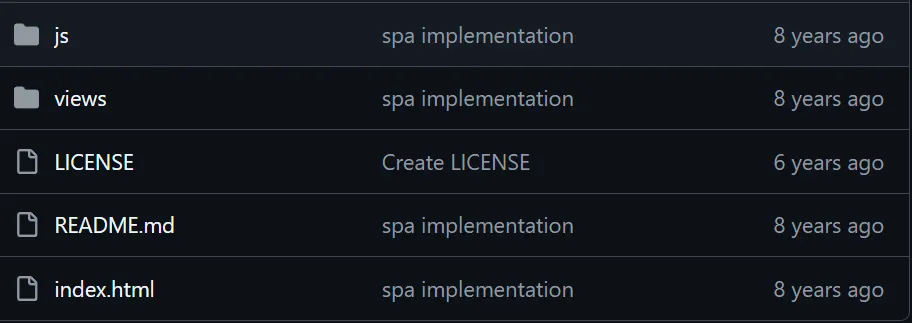
[코드스페이스에 동일한 파일구조 생성]
•
read.me와 license는 필요 x
•
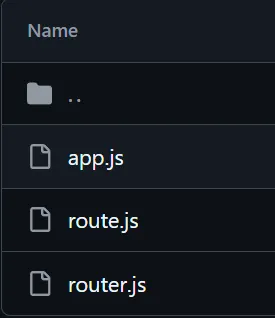
js폴더안에 파일3개
•
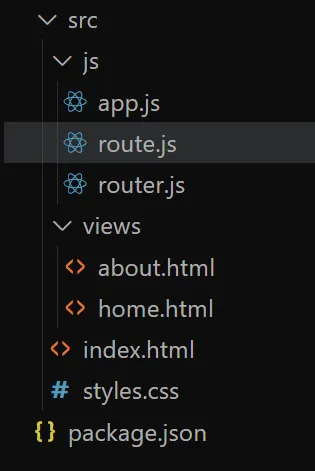
[전체 파일구조]
3-2.파일간 관계
파일 | 주요 역할 | 핵심 공개 API(프로퍼티/메서드) | 의존 관계 | 비고 |
route.js | 라우트 정보(이름, 뷰 파일, 기본 여부) 모델 정의함 | Route(name, htmlName, isDefault) 생성자 | 의존받음: app.js, router.js에서 Route 인스턴스 사용함 | 순수 데이터 구조임 |
router.js | 해시 라우팅 처리 + 뷰(HTML partial) 로딩/주입 담당함 | new Router(routes), init() 내부: _findActiveRoute(), _render(route), _onHashChange() | 의존함: DOM(#app), fetch, Route 인스턴스 배열 | #app에 HTML 주입함 |
app.js | 라우트 테이블 구성 및 라우터 초기화(엔트리) 수행함 | (즉시실행 IIFE 내부에서) router.init() 호출함 | 의존함: Router, Route 모듈 | 시작점(bootstrap) 역할임 |
1.
해시?
•
https://example.com#page1 → 책의 'page1' 섹션으로 바로 이동하는 책갈피
•
책은 그대로인데 (페이지 새로고침 없음), 보는 부분만 바뀜
2.
fetch?
•
비동기적으로 서버에서 데이터를 가져오는 현대적 방법
•
Promise 기반 (async/await 사용 가능)
항목 | 뜻 | 핵심 포인트 | 대표 코드 |
URL hash | URL의 #부터 끝까지(fragment identifier)를 뜻함 | 값이 바뀌면 hashchange 이벤트가 발생함 · SPA 라우팅에 많이 사용함 | |
fetch | 네트워크/리소스를 가져오는 표준 Web API | Promise를 반환함 → 응답은 Response 객체 · 본문은 text() / json() 등으로 꺼냄 · 교차 출처는 기본 mode: "cors" 규칙 적용 |
3-3.실제 SPA뼈대코드
1.
app.js
"use strict";
// 모듈로 명시 가져옴 (전역 의존성 제거됨)
import Route from "./route.js";
import Router from "./router.js";
(function () {
function init() {
// 라우트 테이블 정의함
let router = new Router([
new Route("home", "home.html", true), // 기본 라우트
new Route("about", "about.html"),
]);
router.init(); // 이벤트 바인딩 + 첫 렌더
}
init();
})();
JavaScript
복사
2.
route.js
// Route: 라우트 정의를 담는 간단한 자료구조임
export default function Route(name, htmlName, isDefault) {
this.name = name; // ex) "home"
this.htmlName = htmlName; // ex) "home.html"
this.default = !!isDefault; // 기본 라우트 여부
}
JavaScript
복사
3.
router.js
// Router: 해시 라우팅 + view 주입 담당함
export default function Router(routes) {
this.routes = routes || [];
this.outlet = document.getElementById("app"); // 주입 위치
}
// 현재 활성 라우트를 찾아 반환함 (동일)
Router.prototype._findActiveRoute = function () {
let hash = window.location.hash.replace("#", "");
if (!hash) {
let def = this.routes.find(function (r) {
return r.default;
});
return def || this.routes[0];
}
return this.routes.find(function (r) {
return r.name === hash;
});
};
// ✅ 여기에서 body 클래스 토글을 추가함
Router.prototype._applyBackground = function (routeName) {
let body = document.body;
body.classList.remove("bg-home", "bg-about");
if (routeName === "home") body.classList.add("bg-home");
if (routeName === "about") body.classList.add("bg-about");
};
// 해당 라우트의 html을 fetch하여 #app에 주입함
Router.prototype._render = function (route) {
let self = this;
if (!route) {
this.outlet.innerHTML = "<h2>404</h2><p>Route not found</p>";
document.body.classList.remove("bg-home", "bg-about");
return;
}
// ✅ 라우트에 맞춰 배경 클래스 적용
this._applyBackground(route.name);
fetch("./src/views/" + route.htmlName)
.then(function (res) {
return res.text();
})
.then(function (html) {
self.outlet.innerHTML = html;
})
.catch(function (err) {
self.outlet.innerHTML = "<h2>에러</h2><pre>" + String(err) + "</pre>";
});
};
// 해시 변경 시 처리함 (동일)
Router.prototype._onHashChange = function () {
let route = this._findActiveRoute();
this._render(route);
};
// 초기화 (동일)
Router.prototype.init = function () {
this._onHashChange = this._onHashChange.bind(this);
window.addEventListener("hashchange", this._onHashChange);
this._onHashChange();
};
JavaScript
복사
4.
about.html
<h2>⬆️'상단 글자'를 누르면 페이지 부분 변동</h2>
<h1>About</h1>
<p>라우터는 <code>hashchange</code> 이벤트로 현재 해시를 감지하고,</p>
<p>해당하는 HTML partial을 fetch로 가져와 <code>#app</code>에 주입함.</p>
JavaScript
복사
5.
home.html
<h2>⬆️'상단 글자'를 누르면 페이지 부분 변동</h2>
<h1>Home</h1>
<p>이 페이지는 <b>Vanilla JS</b>로 만든 SPA 예제임.</p>
<p>#home, #about 해시로 화면이 바뀌는 것을 관찰해보자.</p>
JavaScript
복사
6.
index.html
<!DOCTYPE html>
<html>
<head>
<meta charset="utf-8" />
<title>Vanilla SPA (Modernized)</title>
<style>
nav a {
margin-right: 8px;
}
body {
font-family: system-ui, sans-serif;
}
#app {
margin-top: 16px;
}
</style>
</head>
<body>
<nav>
<a href="#home">Home</a>
<a href="#about">About</a>
</nav>
<div id="app">Loading…</div>
<!-- ES Module: 의존성은 app.js에서 import로 해결됨 -->
<script type="module" src="./js/app.js"></script>
<link rel="stylesheet" href="styles.css" />
</body>
</html>
JavaScript
복사
7.
style.css
/* 1) 기본 리셋 */
* {
box-sizing: border-box;
}
html,
body {
height: 100%;
margin: 0;
}
/* 2) 배경 전환 공통 */
body {
transition: background 600ms ease, background-color 600ms ease;
font-family: system-ui, -apple-system, Segoe UI, Roboto, sans-serif;
}
/* 3) Home/About 배경 그라데이션 */
.bg-home {
background: radial-gradient(
1200px 800px at 20% 20%,
#ffd1ff 0%,
#c1b6ff 40%,
#a18cd1 70%,
#fbc2eb 100%
);
}
.bg-about {
background: linear-gradient(
135deg,
#c0f7ea 0%,
#79e7ff 40%,
#7ab8ff 70%,
#4d6fff 100%
);
}
/* 4) 레이아웃 */
nav {
display: flex;
gap: 12px;
padding: 16px;
}
nav a {
text-decoration: none;
padding: 8px 12px;
border-radius: 12px;
background: rgba(255, 255, 255, 0.35);
color: #1b1f23;
font-weight: 600;
box-shadow: 0 2px 10px rgba(0, 0, 0, 0.06);
backdrop-filter: blur(6px);
-webkit-backdrop-filter: blur(6px);
transition: transform 150ms ease, box-shadow 200ms ease, background 200ms ease;
}
nav a:hover {
transform: translateY(-1px);
background: rgba(255, 255, 255, 0.5);
}
/* 5) 모피즘/글라스 카드 - #app 컨테이너 */
#app {
margin: 24px;
padding: 24px;
min-height: 220px;
border-radius: 20px;
background: rgba(255, 255, 255, 0.28);
backdrop-filter: blur(12px) saturate(120%);
-webkit-backdrop-filter: blur(12px) saturate(120%);
border: 1px solid rgba(255, 255, 255, 0.35);
box-shadow: 10px 10px 30px rgba(0, 0, 0, 0.1),
-8px -8px 20px rgba(255, 255, 255, 0.55) inset,
8px 8px 18px rgba(0, 0, 0, 0.08) inset;
transition: box-shadow 250ms ease, background 250ms ease;
}
/* 6) 내부 텍스트 기본 */
#app h1 {
margin: 0 0 8px;
}
#app p {
margin: 0 0 6px;
line-height: 1.6;
}
JavaScript
복사